Jira Change Management Best Practices for Enterprise Teams
Enterprise Jira environments operate under a fundamental tension: the teams using Jira want configurations to evolve quickly to match changing business needs, while the administrators responsible for the instance need those changes to happen without breaking the hundreds of workflows, automations, and integrations that other teams depend on.
Resolving this tension requires a structured approach to change management — one that is lightweight enough not to impede normal operations, but rigorous enough to prevent the configuration regressions that erode trust in the platform.
Why Jira change management is different from software change management
Most ITSM practitioners are familiar with change management for infrastructure and software deployments. Jira configuration change management shares the same principles — categorize, assess, approve, implement, verify — but has several distinctive characteristics:
No staging environment by default. Unlike application deployments, there is no native way to test a Jira configuration change in a staging environment before applying it to production. Jira Cloud does not offer a built-in sandbox for configuration (though some organizations maintain a secondary instance for this purpose).
Changes take effect immediately. A workflow modification in Jira is live the moment you save it. There is no deployment pipeline, no rollback button, no blue-green switch. If a change breaks something, it breaks immediately for every user in the affected projects.
Dependencies are invisible by default. The Jira administration UI does not show you which filters depend on a custom field, or which automation rules reference a workflow status. Understanding the impact of a change requires manual investigation or dedicated tooling.
Building a Jira change management framework
Tier 1: Low-risk changes (self-service)
Some changes are low enough in risk that they can be performed by project administrators without central review:
- Creating new projects from approved templates
- Adding or removing users from project roles
- Creating new issue types in a project-scoped context
- Modifying board configurations within a single project
Tier 2: Medium-risk changes (reviewed)
Changes that cross project boundaries or modify shared configuration objects require review and pre-change impact analysis:
- Modifying global custom fields
- Creating or modifying workflow schemes
- Changing permission schemes
- Modifying screen schemes that span multiple projects
- Creating or modifying automation rules with cross-project scope
For these changes, the process should include: submitting a change request, performing impact analysis to identify all affected elements, notifying affected team leads, implementing in a scheduled maintenance window, and verifying post-change that no regressions occurred.
Tier 3: High-risk changes (formal approval)
Changes to core system configuration require formal CAB (Change Advisory Board) review:
- Modifying global permission schemes
- Restructuring workflow statuses used by many projects
- Deleting or renaming custom fields with broad usage
- Migrating projects between instances
- Modifying Jira system settings
These changes require full impact analysis documentation, multi-stakeholder approval, a rollback plan, and post-implementation review.
The role of impact analysis in Jira change management
The critical input to any change management decision is the impact assessment: what will be affected by this change? Without this information, change classification is guesswork.
For Tier 2 and Tier 3 changes, a formal impact analysis should be run before the change request is approved. This analysis should document:
- Which projects are affected
- Which filters and dashboards will be affected
- Which automation rules reference the modified object
- Which teams own the affected filters and automations (so they can be notified)
- An estimated effort to update or repair affected elements if the change goes wrong
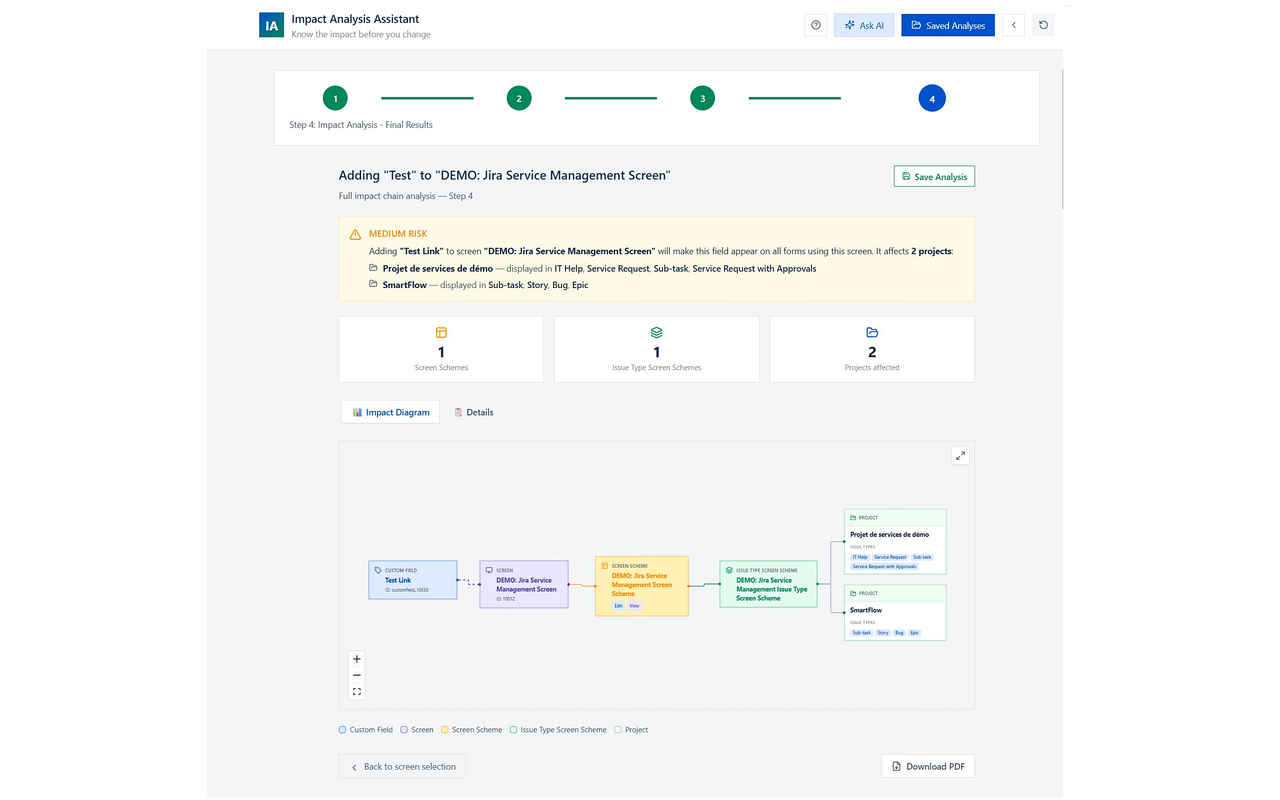
Impact Analysis for Jira automates this documentation. The output of a scan can be saved and attached to the change ticket — creating an audit trail that satisfies both internal governance requirements and external compliance audits.
Communication patterns for Jira changes
The most overlooked part of Jira change management is communication. Even a technically successful change causes frustration if users are not warned in advance.
Effective communication for medium and high-risk changes:
- Announcement: 1–2 weeks before the change, notify all affected team leads with a plain-language description of what will change and why.
- Reminder: 48 hours before implementation, send a follow-up reminding teams of the maintenance window.
- Confirmation: After implementation, send a brief notification confirming the change was completed and any actions users need to take (e.g., updating saved filters).
- Incident channel: Provide a way for teams to report breakage immediately after the change (a dedicated Slack channel or Jira service desk queue).
Measuring change management maturity
A high-maturity Jira change management program has measurable outcomes:
- Incident rate: The number of change-caused incidents per quarter decreases over time.
- Mean time to detect: Breakage caused by changes is detected within hours, not days.
- Rollback frequency: The percentage of changes that required rollback decreases as impact analysis quality improves.
- Stakeholder satisfaction: Teams report feeling informed and unimpacted by configuration changes they did not request.
Starting where you are
If your organization currently has no formal process for Jira configuration changes, the goal is not to immediately implement a full change management framework. Start with one thing: require impact analysis before any change to a globally-scoped Jira object. This single practice will prevent the majority of change-caused incidents and gives you the data to build the case for a more complete program.
Change management is not bureaucracy — it is the practice of making changes with enough information to do them safely. In a complex Jira environment, that information is the difference between a confident administrator and an anxious one.