AI-Powered Jira Administration: How Intelligent Assistants Change Instance Management
Jira administration has always been a domain where expertise matters — and where expertise is hard to scale. A skilled Jira administrator holds an enormous amount of institutional knowledge: which fields are used where, which workflows are connected to which projects, which automation rules will break if a certain status is renamed. This knowledge lives largely in people’s heads, not in documentation.
AI is beginning to change this. Not by replacing administrators — but by making their expertise immediately queryable, and by surfacing dependency information that would otherwise require hours of manual investigation.
The core problem AI solves in Jira admin
The fundamental challenge of Jira administration is not executing changes. It is understanding the full consequences of a change before executing it. An experienced administrator can make a complex workflow change in 5 minutes. But investigating whether that change is safe — manually checking all connected filters, automations, screens, and reports — can take 2–3 hours.
This is where AI assistance delivers immediate value. Instead of spending hours navigating the administration UI to understand dependencies, an administrator can ask: “Which projects will be affected if I change this workflow’s statuses?” and receive a complete, structured answer in seconds.
What makes Jira administration a good fit for AI
Jira’s configuration is highly structured and relational. Every object — custom field, workflow, screen, permission scheme — has a defined set of attributes and a defined set of relationships to other objects. This relational structure is exactly what AI models are good at navigating.
Unlike open-ended creative tasks, dependency analysis in Jira has verifiable correct answers. Either a filter references a field name or it does not. Either an automation rule uses a workflow status as a trigger or it does not. This makes AI output in this domain highly reliable — the model is not generating speculative answers, it is traversing a concrete data structure.
Practical AI use cases in Jira administration
Natural language impact queries
The most immediate use case is natural language querying of your instance’s dependency graph. Examples of questions an AI assistant can answer instantly:
- “What will break if I remove the ‘Customer Tier’ custom field?”
- “Which automation rules reference the ‘Waiting for Customer’ status?”
- “Which projects use the ‘Software Development’ workflow scheme?”
- “How many active filters contain JQL referencing this board?”
These questions can be answered manually, but each requires 15–30 minutes of navigation through the administration UI. An AI assistant surfaces the same information in seconds.
Pre-change risk assessment
Before executing a planned change, an AI assistant can categorize the risk level based on the dependency scan:
- Low risk: The object has 0–2 dependencies, all owned by the requesting team.
- Medium risk: 3–10 dependencies, spanning multiple teams that need to be notified.
- High risk: 10+ dependencies, including governance-critical reports or SLA-related automations.
This classification allows administrators to apply the right level of process to each change — not requiring heavyweight change management for low-risk operations, but flagging high-risk changes for formal review.
Documentation generation
AI can transform a dependency analysis report into human-readable change documentation automatically. Instead of manually writing a change record explaining what was modified and what was verified, the AI generates a structured summary from the analysis data — ready for ITSM ticket attachment or audit file storage.
How Impact Analysis for Jira implements AI assistance
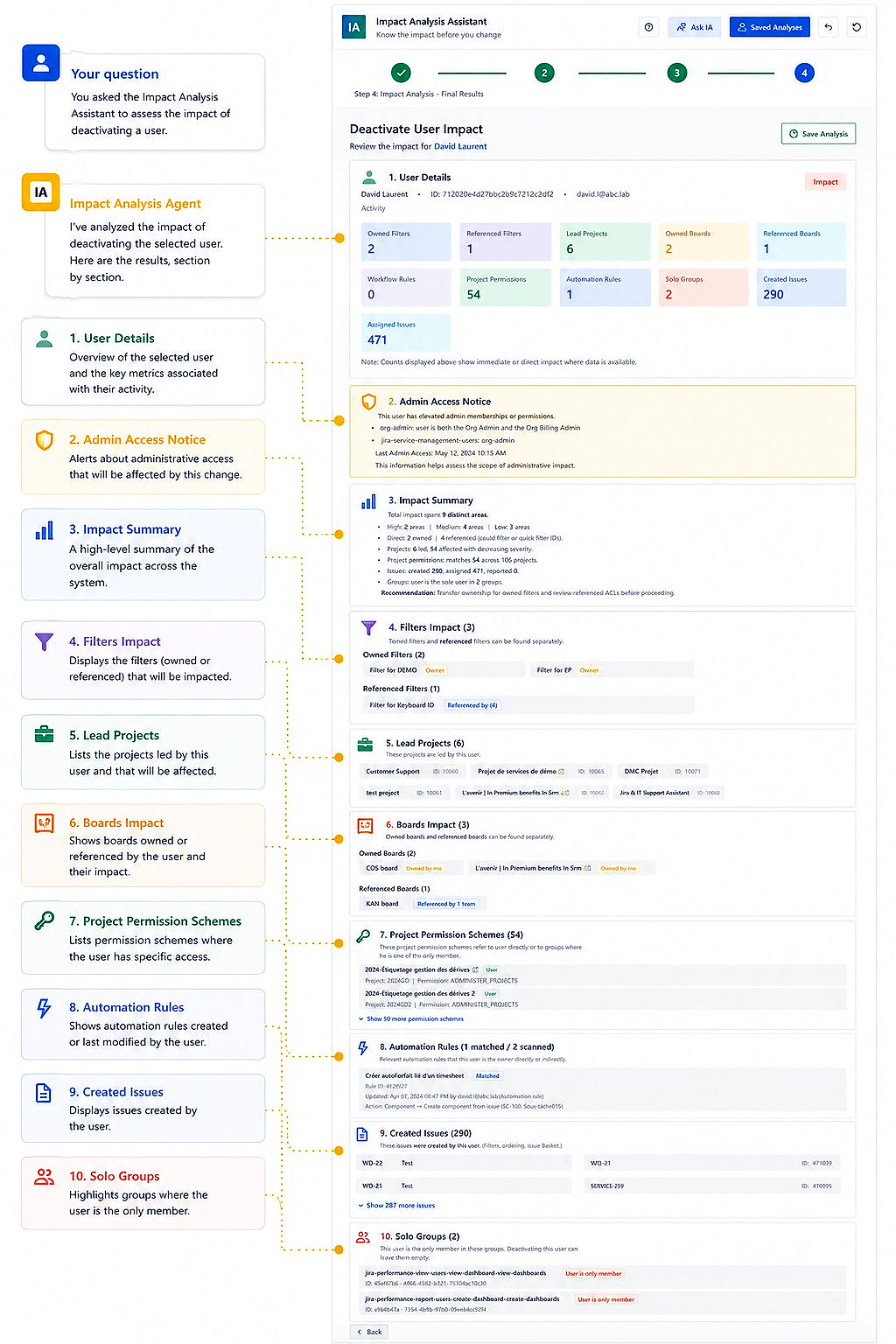
Impact Analysis for Jira includes an AI Admin Assistant that operates directly inside your Jira Cloud instance. It is Forge-native, which means your data never leaves the Atlassian environment.
You ask a question in plain language. The assistant identifies the relevant Jira objects, runs the dependency analysis, and returns a structured report. The results are the same as a manual analysis — but delivered in seconds rather than hours.
The assistant is particularly useful for new administrators who are still building institutional knowledge of the instance, and for experienced administrators taking on new client environments where they lack historical context.
The future: from reactive to proactive governance
Current AI assistance in Jira administration is largely reactive — you ask a question, you get an answer. The next evolution is proactive governance: the system monitors configuration changes as they occur and automatically flags dependencies that need attention.
Imagine receiving a notification: “A workflow you depend on in 3 automation rules was modified yesterday. Here is what changed and here is the impact on your rules.” This shifts administrators from firefighting after incidents to preventing them before they occur.
This is the direction Stable Point IO is building toward — an always-on governance assistant that makes Jira configuration safe by default, not just when you remember to check.
Conclusion
AI-powered Jira administration is not a distant future. It is available today, in the form of intelligent assistants that turn complex dependency queries into instant structured answers. For any administrator managing an instance with hundreds of projects, fields, and automations, this represents a genuine qualitative shift in what it means to “know your instance.”